The spacebar counter challenge looks simple on the surface: hit the spacebar as many times as possible before the timer runs out. But once you’ve run it a few times, you’ll notice something — your score plateaus fast. Most people hit a wall around 40-60 taps in 10 seconds and stay there no matter how hard they try, simply because they’re relying on brute force instead of technique.
The good news is that spacebar tapping speed, like click speed, is a trainable skill. With the right finger mechanics, timing, and practice structure, most people can meaningfully raise their score within a few sessions. This guide breaks down exactly how the challenge is scored, what a competitive result looks like, and the techniques serious players use to push past their personal best.
What Is the Spacebar Counter Challenge?
The Spacebar Counter is a timed test that counts how many times you press the spacebar within a set duration — usually 5, 10, 15, 30, or 60 seconds. It’s a close cousin of the classic CPS Test, except instead of mouse clicks, it measures keyboard tapping speed and rhythm.
It’s popular for a few reasons:
- Gaming relevance — many browser and mobile games use the spacebar for jumping, boosting, or rapid-fire actions, so tapping speed translates directly into gameplay performance.
- Reflex and endurance testing — short bursts test raw reaction speed, while longer durations test your ability to sustain a fast rhythm without fatigue.
- Simple, measurable competition — like CPS testing, it’s an easy number to compare with friends or track over time.
How Is Your Score Calculated?
The math behind the spacebar counter is straightforward: the tool counts every registered keydown event on the spacebar during the test window and displays the total, along with your average taps per second.
Taps Per Second = Total Taps ÷ Test Duration (seconds)
If you tap the spacebar 95 times in a 10-second test, that’s 9.5 taps per second — a genuinely fast, competitive result. Most testers, including ours, also show a live counter and post-test breakdown so you can see whether your pace was consistent or whether you started fast and faded (a very common pattern).
Average vs. Competitive Spacebar Scores
Here’s roughly how scores break down based on aggregated results across click-speed and spacebar-testing platforms:
| Skill Level | Taps in 10 Seconds | Taps Per Second |
|---|---|---|
| Casual / First Try | 30–45 | 3–4.5 |
| Average | 45–65 | 4.5–6.5 |
| Good | 65–85 | 6.5–8.5 |
| Fast | 85–100 | 8.5–10 |
| Elite / Competitive | 100+ | 10+ |
If you’re consistently landing in the “Fast” range or above, you’re already ahead of the vast majority of casual testers. Elite scores over 100 taps in 10 seconds almost always come from players using a specific tapping technique rather than simply mashing the key with one finger.
The Techniques That Actually Move the Needle
Just like competitive clicking has jitter clicking and butterfly clicking, spacebar tapping has its own set of techniques with measurably different results.
1. Single-Finger Tapping (Baseline)
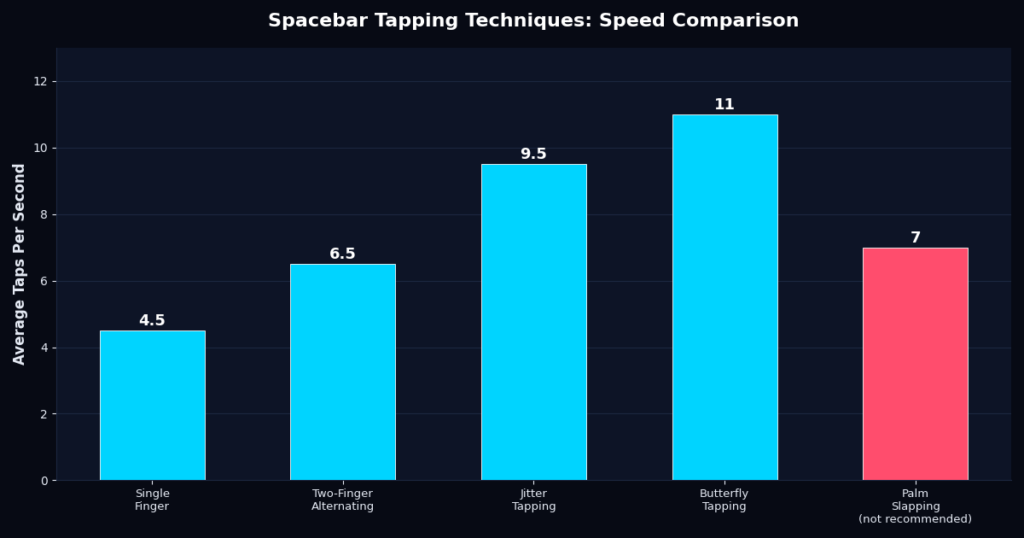
This is how almost everyone starts: one finger, direct presses. It’s reliable and low-effort, but it caps out quickly because a single finger has to fully reset between every tap. Most people plateau around 4-5 taps per second with this method.
2. Two-Finger Alternating
Using your index and middle finger to alternate presses reduces the reset time between taps, since one finger can be repositioning while the other is pressing. This alone often adds 1.5-2 taps per second over single-finger tapping.
3. Jitter Tapping
Borrowed directly from competitive CPS testing, jitter tapping uses controlled muscle tension in the forearm and wrist to generate rapid, small-amplitude taps rather than full deliberate presses. It takes practice to control, but experienced testers regularly hit 9-10+ taps per second with this method. If you’ve practiced jitter clicking for mouse-based CPS tests, the underlying mechanic transfers almost directly.
4. Butterfly Tapping
Butterfly tapping — using two fingers rapidly alternating on the same key in a fluttering motion — is the highest-scoring technique for most testers, often pushing past 11 taps per second. It requires more coordination to control accurately, but it’s currently the go-to method among leaderboard-chasing spacebar testers.
A Note on Palm Slapping
Some testers try slapping the key with an open palm or multiple fingers at once for a burst of speed. It might feel fast, but key debounce (the delay built into keyboards to prevent accidental double-presses) often causes missed registrations, and it’s hard on both your hand and your keyboard. It’s not recommended for serious score-chasing — and definitely not for extended practice sessions.
Step-by-Step: How to Improve Your Score
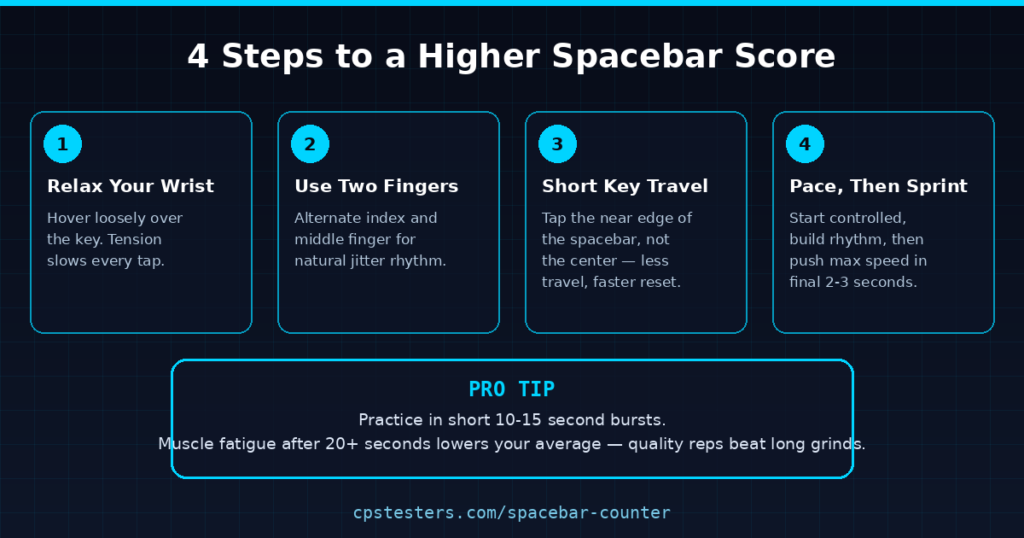
- Relax your wrist and hand. Tension is the single biggest speed killer. Hover your fingers loosely just above the key instead of pressing down with force.
- Switch to two-finger tapping immediately. Even without mastering jitter or butterfly technique, alternating fingers alone produces a noticeable jump in score.
- Tap the near edge of the spacebar, not the center. The spacebar is a long key, but tapping closer to the edge nearest your fingers shortens travel distance and speeds up your reset time.
- Pace yourself, then sprint. Many testers burn out in the first 3 seconds and fade badly by the end. Start at a controlled, sustainable rhythm, then push your hardest in the final 2-3 seconds when adrenaline and momentum are highest.
- Warm up before attempting your best run. A 30-second loose warm-up round primes your hand muscles and consistently produces better “real” attempts afterward.
- Practice in short bursts, not long grinds. 10-15 second practice reps, repeated with short rests, build speed more effectively than one long fatiguing session. Fatigue lowers your average and can reinforce sloppy technique.
Common Mistakes That Cap Your Score
- Pressing too hard. A harder press doesn’t register faster — it just tires your hand out sooner and can trigger debounce delays.
- Using only your dominant finger. Sticking with one finger long after you’ve plateaued is the most common reason scores stall.
- Ignoring rhythm for raw force. Panicked, uneven mashing is almost always slower than a controlled, even tapping rhythm — your brain and hand coordinate better with a predictable pattern.
- Skipping warm-ups. Cold muscles react slower; a quick warm-up round before your “real” attempt matters more than most people expect.
- Testing on a low-quality or worn keyboard. Mushy switches or keys with excessive travel distance slow every technique down, regardless of skill.
Does Your Keyboard Matter?
Yes — more than most people assume. Mechanical keyboards with shorter actuation distances and lighter switches (like red or speed-silver switches) allow faster resets between taps compared to standard membrane keyboards. If you’re serious about chasing a leaderboard-level score, testing on a mechanical board with a shorter travel distance can meaningfully boost your numbers without changing your technique at all.
Test Your Spacebar Speed Now
Ready to see where you land? Try the free Spacebar Counter on CPS Testers and compare your results against the benchmarks above. If you want to test related reflex skills, check out our CPS Test for click speed, or the WPM Test to measure your typing speed across a full keyboard instead of a single key.
Frequently Asked Questions
What’s a good spacebar counter score in 10 seconds? Around 65-85 taps in 10 seconds is considered good, while 100+ puts you in elite, competitive territory.
Is jitter tapping bad for your hand? Extended jitter tapping sessions can cause hand or wrist fatigue, so it’s best practiced in short bursts with rest between attempts rather than long continuous sessions.
Does keyboard type affect my score? Yes. Mechanical keyboards with short actuation distances typically allow faster, more consistent tapping than membrane or laptop keyboards.
What’s the difference between jitter and butterfly tapping? Jitter tapping uses controlled muscle vibration in the wrist and forearm with one or two fingers, while butterfly tapping uses two fingers rapidly alternating in a fluttering motion — butterfly typically scores slightly higher but takes more coordination to master.
How often should I practice to improve? Short daily sessions of 5-10 minutes, broken into multiple 10-15 second bursts, tend to produce faster improvement than infrequent long sessions.
Think you’ve got a fast hand? Put it to the test on the Spacebar Counter and see how your score stacks up against the benchmarks above.