Free Grammar Checker Tool
Typos and grammar slips don’t just look sloppy — they quietly undermine trust. A single misplaced apostrophe in an email, a subject-verb mismatch in a resume, or a run-on sentence in a blog post can make even well-researched content look careless. And with more writing happening faster than ever — emails, social posts, product descriptions, assignments — manually proofreading everything just isn’t realistic.
That’s exactly the gap a free grammar checker fills. Instead of re-reading your own work five times (and still missing mistakes, because your brain autocorrects errors as you read), a good grammar checker scans your text in seconds and flags what needs fixing. This guide covers how grammar checkers actually work, what kinds of mistakes they catch, and how to get the most out of our free Grammar Checker tool.
What Is a Grammar Checker Tool?
A grammar checker is software that analyzes written text and flags spelling errors, grammar mistakes, punctuation issues, and often style or clarity problems. Modern checkers go well beyond the basic red-squiggly-line spell check built into word processors — they analyze sentence structure, word context, and tone to catch mistakes that simple dictionary-matching would miss entirely.
For example, a basic spell checker won’t catch “their” used instead of “there,” since both are correctly spelled words. A proper grammar checker, on the other hand, analyzes the sentence context to recognize that the wrong word was used — even though nothing is technically misspelled.
How Does a Free Grammar Checker Work?
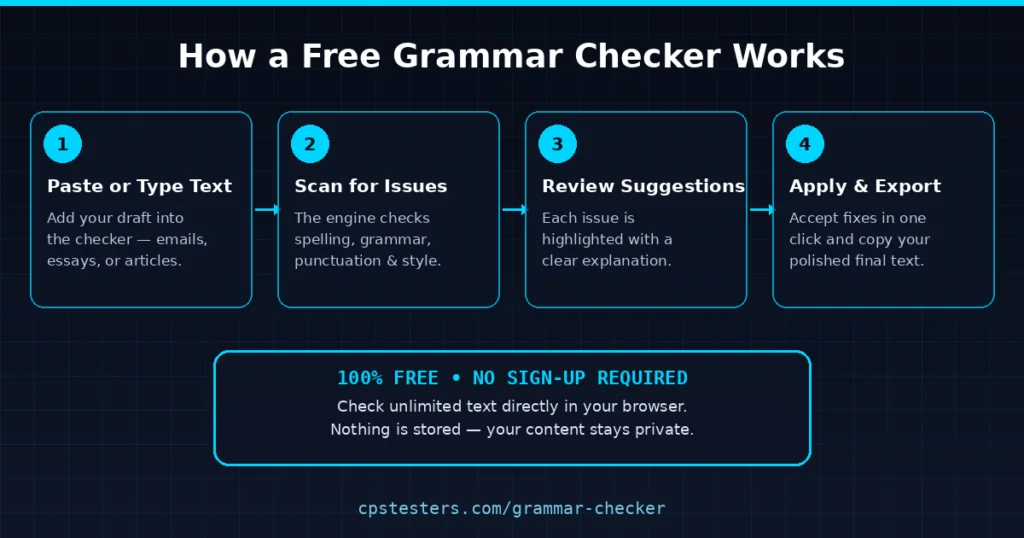
Behind the scenes, grammar checking tools typically combine a few different techniques:
- Rule-based grammar analysis — checking your text against established grammar rules (subject-verb agreement, tense consistency, article usage, etc.)
- Dictionary and spell-check matching — comparing every word against a language dictionary to catch misspellings and typos
- Contextual language analysis — using natural language processing to understand word relationships, so it can catch issues like wrong word usage, awkward phrasing, or unclear sentence structure
- Style and readability scoring — flagging overly long sentences, excessive passive voice, or repetitive phrasing that hurts clarity
When you paste your text into a checker, all of this happens virtually instantly. Issues get highlighted directly in your text, usually with a brief explanation of what’s wrong and a one-click suggested fix — similar to how you’d review edits from a human proofreader, just far faster.
What Kinds of Errors Does It Catch?
Not all grammar issues are created equal — some show up constantly, while others are rarer but more damaging when they slip through. Here’s how common issue types typically break down across everyday writing:
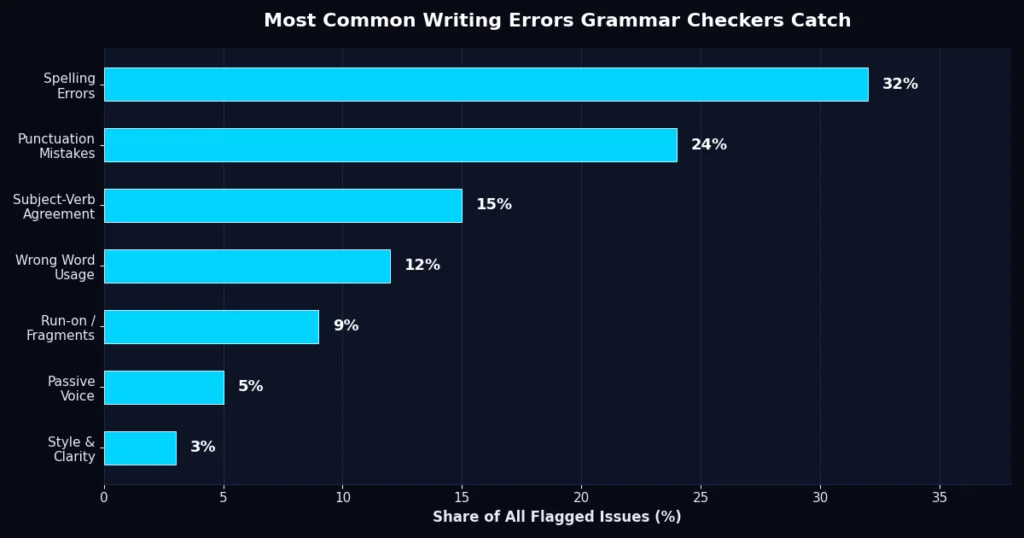
- Spelling errors — by far the most common category, including simple typos and commonly confused words
- Punctuation mistakes — missing commas, incorrect apostrophes, misused semicolons, and inconsistent quotation marks
- Subject-verb agreement — mismatches like “the team are” instead of “the team is”
- Wrong word usage — correctly spelled but contextually incorrect words (“your” vs. “you’re,” “affect” vs. “effect”)
- Run-on sentences and fragments — sentences that either never end or that aren’t complete thoughts
- Passive voice overuse — grammatically correct but often weaker and less direct than active voice
- Style and clarity issues — overly complex phrasing, redundancy, or unclear sentence structure
Why Use a Grammar Checker Instead of Just Proofreading Yourself?
Self-editing has a well-documented blind spot: when you already know what you meant to write, your brain often “auto-corrects” what you read, skipping right past errors that would be obvious to someone else. This is why professional writers and editors almost always use a second set of eyes — human or software — before publishing anything important.
A grammar checker solves this in a few concrete ways:
- Speed — scanning a 1,000-word article manually takes several minutes of careful reading; a checker does it in seconds.
- Consistency — a tool applies the same grammar rules every time, without fatigue-driven blind spots.
- Objectivity — it catches issues regardless of how confident you feel about a sentence, since it’s not relying on your memory of what you “meant” to write.
- Learning — seeing explanations for each flagged issue helps you internalize grammar rules over time, so you naturally make fewer mistakes in future writing.
None of this replaces a human editor for nuanced tone or persuasive writing — but for catching the mechanical errors that quietly damage credibility, a checker is faster and more consistent than manual proofreading alone.
Who Actually Needs a Grammar Checker?
- Students — for essays, research papers, and applications where grammar mistakes can directly affect grades
- Job seekers — resumes and cover letters with typos are one of the fastest ways to get filtered out by recruiters
- Content creators and bloggers — clean copy builds reader trust and reduces bounce rates on published content
- Non-native English speakers — grammar checkers help catch subtle mistakes that are easy to miss when writing in a second language
- Professionals — emails, reports, and proposals all reflect directly on perceived competence and attention to detail
- Social media managers — public-facing posts get scrutinized fast, and typos in brand content spread just as fast as the content itself
Tips to Get the Most Out of a Grammar Checker
- Don’t blindly accept every suggestion. Review each flagged issue — automated tools occasionally misread context, especially with technical terms, names, or intentional stylistic choices.
- Check in stages for long documents. Run shorter sections through the checker rather than pasting an entire lengthy document at once, so you can review each fix carefully.
- Re-read after applying fixes. Corrections can sometimes shift sentence meaning slightly — a quick final read ensures everything still sounds like you.
- Use it as a learning tool, not just a fixer. Pay attention to the explanations behind flagged issues; recognizing patterns in your own mistakes helps you write cleaner drafts from the start.
- Combine it with a read-aloud pass. Reading your text out loud after running it through a checker catches awkward phrasing that grammar rules alone won’t flag.
Grammar Checkers vs. AI Writing Assistants
It’s worth distinguishing between a grammar checker and a full AI writing assistant. A grammar checker focuses specifically on correctness — spelling, grammar, punctuation, and basic clarity. An AI writing assistant goes further, potentially rewriting entire sentences, adjusting tone, or generating new content outright.
For most everyday writing tasks — emails, homework, quick edits — a focused grammar checker is faster, simpler, and keeps your original voice intact rather than rewriting your ideas for you. It’s the difference between a proofreader and a ghostwriter: one polishes what you wrote, the other replaces it.
Try It Free — No Sign-Up Required
Ready to clean up your writing? Run your text through our free Grammar Checker — no account, no downloads, and no limit on how many times you can check your work. If you’re also working on typing speed or general productivity, pair it with our WPM Test to measure how fast you type, or the CPS Test if you’re curious about your click speed too.
Frequently Asked Questions
Is a free grammar checker as good as a paid one? Free grammar checkers reliably catch the most common issues — spelling, punctuation, and basic grammar mistakes. Paid tools often add deeper style suggestions, plagiarism checks, and tone analysis, but for everyday writing, free tools cover the vast majority of what most people need.
Does using a grammar checker mean my writing is stored online? Reputable browser-based checkers, including ours, process your text directly for checking purposes and don’t require an account to use — always check a tool’s privacy practices if you’re working with sensitive content.
Can a grammar checker fix my writing style, not just errors? Many checkers flag style issues like passive voice, wordiness, and repetitive phrasing alongside strict grammar errors, giving you a more complete picture of your writing quality.
Will a grammar checker catch everything? No tool is perfect — nuanced tone, humor, and highly technical or creative writing can still slip past automated checks, which is why a final human read-through is always worth doing for important content.
Is it cheating to use a grammar checker for schoolwork? Using a grammar checker is generally treated the same as using a dictionary or spell check — it helps you correct your own writing rather than generating new content, though it’s worth confirming your institution’s specific policy.
Don’t let small mistakes undercut your writing. Run it through the free Grammar Checker and publish with confidence.